Baby Phone & Kids Games
RV AppStudiosEducational
4.435.00 Reviews
- Version
- Varies With Device
- Installs
- 5.00M
- Age Rating
- Everyone
Screenshots

Our Review of Baby Phone & Kids Games
 Analysis by Appyee
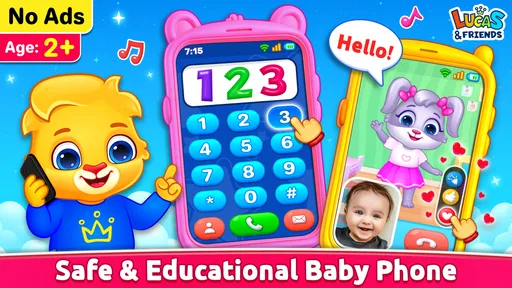
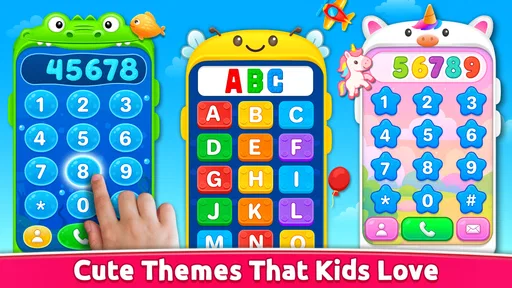
When I tried Baby Phone & Kids Games, the part that stayed with me was not the phone theme itself, but how it turns a familiar object into a simple learning prompt. A child can tap through a pretend calling experience while meeting sounds, numbers, and letters in a setting that feels more like play than a lesson. That single idea gives the game its strongest identity.
This is a free educational game from RV AppStudios for babies, toddlers, and young children. It has an Everyone age rating, works on devices running Android 6.0 or later, and is currently at version 1.2.5. The store summary points to sounds, numbers, ABCs, and phone calls, but in everyday use the value comes from how those subjects are presented together: the child gets a familiar action, then a small learning moment attached to it.
The important question is whether a pretend phone is a useful learning tool for your child. In my experience, it can be, especially when an adult uses it as a short shared activity rather than leaving it to carry the whole educational experience alone. It is not a replacement for books, conversation, physical toys, or a structured early-learning program. It is better understood as an accessible first step into interactive learning.
Why the pretend-phone idea works
A phone interface gives a young child an immediate reason to touch the screen. Many early-learning games begin with a worksheet-like layout or a collection of disconnected activities. This one starts from an object children already recognize from daily life. Even when the child is too young to understand every symbol, the act of tapping and “calling” creates a clear beginning and end.
That matters because toddlers often respond better to an action than to an instruction. “Learn numbers” is abstract. Pressing a number during a pretend call is concrete. The same applies to letters and sounds: the child is not simply looking at a lesson page, but interacting with a familiar visual idea. I found that this makes the first few minutes easier to manage, particularly for a child who loses interest quickly in more formal educational apps.
The phone theme also gives parents a natural way to participate. You can ask which number was pressed, repeat a sound, or invite the child to find a letter. The game becomes a prompt for conversation instead of a silent screen activity. That is a meaningful strength, because early learning often depends as much on hearing and repeating language with an adult as it does on recognizing a symbol.
Still, the theme has a limit. A pretend call can attract attention, but it cannot guarantee sustained learning. Once the novelty wears off, the child may tap quickly without listening carefully. I would therefore treat the phone concept as an invitation to engage, not as proof that every interaction is educational.
Sounds, numbers, and letters in one short activity
The combination of subjects is useful for families who want one uncomplicated game for several early-learning moments. A parent can move from sound recognition to number practice and then to the alphabet without opening separate applications. That makes it convenient during a short wait, a quiet period at home, or a transition between activities.
The trade-off is that a broad selection can feel less focused than a dedicated alphabet or counting app. If your child is already working on a specific skill, a specialized program may offer a clearer progression. Baby Phone & Kids Games is more suitable when you want gentle exposure across several basics rather than intensive practice in one area.
I also like the possibility of using the same interaction at different levels. A very young child may simply enjoy the sounds and tapping. An older toddler can begin naming numbers or letters. A parent can make the activity more demanding by asking the child to repeat what was heard or identify a symbol before pressing it. The game itself remains simple, while the adult adjusts the challenge.
What the interaction feels like in practice
The experience is built around quick responses and familiar visual cues rather than long explanations. That is appropriate for the intended audience. Young children usually need immediate feedback and short turns; a complicated menu would create more frustration than learning. The phone format keeps the basic idea understandable even when a child cannot read.
One practical tip is to begin with a clear goal. Instead of handing over the device and saying “play,” I would say, “Let’s find a number,” or “Which sound do you want to hear?” This changes the session from random tapping into a small activity with a purpose. Afterward, I would put the device away and connect the screen to something real, such as counting blocks or pointing out letters in a picture book.
Another useful approach is to let the child lead for a moment, then take one turn yourself. If the child taps a number, repeat it aloud. If a sound appears, imitate it and ask whether the child can do the same. The game then supports listening, turn-taking, and speech practice, areas that a child would not necessarily develop through independent tapping.
Because the app is aimed at babies and toddlers, adults should expect uneven attention. A child may enjoy sound-based play one day and prefer letters another day. I would not interpret a short session as failure. The better measure is whether the child returns to a symbol, sound, or number and begins to recognize it over repeated shared sessions.
A realistic family use case
Imagine a parent waiting with a toddler before leaving the house. The child is restless, but the parent wants something quieter than a video. A short session with this game can provide a familiar activity: the child taps through the pretend phone, hears a sound, explores a number, and looks at letters. The parent can join in for a few minutes, then end the session by asking the child to find a real object connected to what appeared on screen.
In that situation, the game works because it is easy to start and does not require a long explanation. It also gives the parent several ways to redirect attention. If random tapping begins, the adult can ask for one particular number. If the child becomes tired, the activity can stop without interrupting a long level or complicated challenge.
I would not use it as a way to keep a child occupied for an entire journey. Its strongest role is a short bridge between moments: while waiting, during a calm indoor break, or as a shared activity before moving on to a physical game. The phone concept is most effective when it opens a conversation rather than replacing one.
For a preschooler who is beginning to recognize letters, the adult might ask the child to say the letter aloud and then look for the same letter in a book. For a younger toddler, the goal may be much simpler: press, listen, smile, and repeat. The same app can therefore fit different stages, but the learning result depends heavily on how the adult frames the activity.
Where it fits among other early-learning choices
Compared with a standard alphabet-only game, this title feels broader and more playful. It does not ask the child to remain inside one narrow lesson. That is helpful for children who resist repetition or who are still discovering what interests them. The phone theme may also feel more approachable than a formal educational interface.
Compared with a video, it offers a more active role because the child has to tap and choose rather than only watch. That does not automatically make every minute more valuable, but it gives the parent more opportunities to ask questions and observe what the child understands.
Compared with physical flashcards, blocks, or picture books, it is more portable and immediately responsive. Physical alternatives remain better for developing hands-on coordination and for encouraging children to look away from a screen. My preference is to use Baby Phone & Kids Games as one small part of a rotation, not as the default answer whenever a child is bored.
Families looking for deep phonics instruction, detailed counting exercises, or a visible learning path may be happier with a dedicated educational product. This game’s appeal is its low barrier to entry and mixed early-learning focus. It is a companion activity, not a complete curriculum.
Small habits that make it more useful
First, keep the device at a comfortable viewing distance and use the game in a bright, calm setting. A toddler who is already overstimulated may tap rapidly without absorbing anything, so a quieter moment usually produces better interaction.
Second, use repetition outside the app. If a child enjoys a particular sound, repeat it during play with toys. If a number catches their attention, count nearby objects. This turns a digital response into something connected to the child’s world, which is more valuable than simply moving from one screen to the next.
Third, stop while the child is still interested. Ending after a short successful exchange can make the next session easier. There is no advantage in stretching the activity until the child becomes frustrated, especially when the intended audience includes very young children with limited attention spans.
Fourth, watch how the child uses the interface. If the child repeatedly presses without looking, the game may currently be functioning as sound entertainment rather than learning. That is not necessarily a problem, but it tells me to simplify the goal, join the activity, or choose a non-screen alternative for that moment.
Where the experience may fall short
The same simplicity that makes the game approachable can make it feel limited for children who are ready for more challenge. Once a child already knows the basic letters and numbers, the phone theme may not provide enough depth to maintain interest. In that case, a more structured app with progression or problem-solving would probably be a better next step.
There is also a risk that the phone framing encourages imitation of device use without much reflection. Some parents may prefer educational games built around animals, books, drawing, or physical exploration. If your household is trying to reduce phone-centered play, this particular theme may not be the best fit even though its purpose is educational.
Parents should also remain involved with very young users. A child can accidentally leave the intended activity through ordinary tapping, or simply become absorbed in pressing buttons without understanding what they represent. I would test the experience myself first, then decide how much independent use feels appropriate for the child’s age and habits.
The game is free, which makes it easy to try without committing money. That is a genuine advantage for families who want to see whether the phone concept suits their child. At the same time, “free” does not mean it should automatically become the family’s main learning tool. The right choice still depends on the child’s attention, interests, and the amount of adult guidance available.
Who gets the most from it
I think the best match is a baby or toddler who enjoys tapping, listening, and copying sounds, especially when a parent or caregiver is nearby to turn each interaction into a question or conversation. It can also suit families who want one lightweight educational game that introduces several basics without requiring a complicated setup.
It is less suitable for children who need advanced practice, a carefully sequenced course, or substantial offline creativity. It may also be a poor choice for a child who becomes overly focused on pretending to make calls. In that situation, a book, puzzle, drawing activity, or physical counting game could support the same learning goals with less screen emphasis.
The game has reached more than five million installs and holds a 4.3 average from around 4.3 thousand ratings, which suggests that its straightforward approach has found a broad audience. Those figures do not change my main conclusion: popularity is not a substitute for fit. A child’s response during the first few shared sessions is more useful than any general audience size.
For compatibility, the Android requirement is modest, so owners of older supported devices may be able to try it without upgrading hardware. The free price also lowers the risk of testing it during a short routine. I would still introduce it deliberately, with a time boundary and a simple learning prompt, rather than presenting it as an unlimited toy.
My recommendation after using it
Baby Phone & Kids Games is at its best when the pretend phone becomes a doorway to real interaction. Its most convincing strength is the way it packages sounds, numbers, and letters inside an action that a young child understands quickly. That makes it friendly for first exposure and convenient for short shared sessions.
My reservation is that the same easy design may not hold the attention of children who are ready for deeper challenges. It also needs adult participation to reach its full educational value. Left entirely alone, a toddler may enjoy the tapping without making much progress in recognition or language.
I would recommend giving it a try if you want a free, gentle educational game for a young child and are happy to sit nearby for at least part of the activity. Use it before a book, after counting toys, or during a brief waiting period, then connect what happened on screen to something physical. That is where I found the experience most worthwhile.
As a focused tool for early exploration, it earns a place in a family’s rotation. As a complete learning solution, it falls short. The developer, RV AppStudios, has chosen an accessible idea, and the result is most useful when parents treat the phone interface not as a babysitter, but as a small prompt for listening, speaking, counting, and discovering letters together.
Privacy and Permissions
See what permissions an app requests and how it handles your data.
- Camera
- take pictures and videos
- Other
- view network connections, full network access, run at startup, control vibration, prevent device from sleeping, Google Play license check
Verdict
Strengths of Baby Phone & Kids Games
- Bright, child-friendly design is easy for toddlers to recognize.
- Simple controls let young children play with little assistance.
- Includes several mini-games for varied play sessions.
- Fun sounds and animations help keep children engaged.
- Works well as a short, casual distraction for preschoolers.
Limitations of Baby Phone & Kids Games
- Some activities may feel repetitive after frequent use.
- Sound effects can be loud without careful volume control.
- Limited challenge may not suit older children.
- In-app ads or purchase prompts may require parental supervision.
- Gameplay offers little educational depth beyond basic interaction.
Other Releases by RV AppStudios
View All
Coloring Games: Color & Paint
Educational4.4

Drawing Games: Draw & Color
Educational4.3

Baby Games: Piano & Baby Phone
Educational4.4

Puzzle Kids: Jigsaw Puzzles
Educational4.4
Similar Picks in This Category
View All
Little Panda Policeman
BabyBus4.0

Monster Trucks Game for Kids 2
Raz Games4.1

Little Panda's Chinese Recipes
BabyBus4.4

Little Panda's Restaurant
BabyBus4.4

Little Panda's Ice Cream Games
BabyBus4.3

Baby Panda Care
BabyBus3.8
Frequently Asked Questions
What is Baby Phone & Kids Games?
Baby Phone & Kids Games is a colorful educational app designed for toddlers and preschool children. It combines a pretend smartphone interface with simple mini-games, sounds, animations, numbers, animals, music, and other child-friendly activities. The app is intended to provide short, entertaining play sessions while helping young children explore basic concepts through touch-based interaction and playful feedback.
Is Baby Phone & Kids Games suitable for toddlers?
The app is generally designed for very young children, including toddlers and preschoolers, because its controls are simple and most activities rely on tapping large, colorful buttons. However, children develop at different rates, so parents should try the available games first and adjust the experience accordingly. Adult supervision is recommended, especially for children who may accidentally access advertisements or device settings.
Does Baby Phone & Kids Games require an internet connection?
Many of the core activities in Baby Phone & Kids Games may be playable without a continuous internet connection after installation, which can make the app convenient for travel or offline play. Nevertheless, certain features, advertisements, updates, or optional content may require internet access. Checking the app-store description and testing it in airplane mode is the safest way to confirm which functions remain available offline.
Is Baby Phone & Kids Games free to download and safe for children?
The app may be available as a free download, but free versions can include advertising, optional purchases, or limitations on some activities. Parents should review the store listing, privacy information, and permission requests before allowing a child to use it. To avoid accidental purchases or unwanted interactions, enable parental controls and, when possible, choose a child-focused or ad-free version.
What are the main benefits and drawbacks of Baby Phone & Kids Games?
The main benefits are its bright visuals, simple controls, variety of short activities, and ability to keep young children engaged while introducing sounds, numbers, colors, animals, and basic coordination. The experience can become repetitive for older children, and advertisements or in-app purchase prompts may reduce its appeal if included. It works best as occasional supervised entertainment rather than a replacement for hands-on play.
Play our best games!


